
AI FOR GRAPHIC DESIGNERS IN 2026: HOW TO INTEGRATE AI INTO YOUR REAL DESIGN WORKFLOW
Somewhere over the last year, AI stopped being “the shiny thing designers should probably check out.” It moved into our software. Into our workflows. Into client expectations. Nobody is asking, “Should designers use AI?” anymore. They’re asking: “How do I stay in control when everything moves this fast?”
This article is for graphic designers who want to integrate AI into their workflow without losing authorship, strategy, or creative control.
TL;DR
AI isn’t “the thing designers should try.” It’s already inside the design process — quietly shaping research, visuals, motion and client expectations. The real shift in 2026 isn’t learning more tools. It’s learning how to design creative systems where AI supports your judgment, taste and strategy instead of replacing them.
If that idea resonates, we’re unpacking it properly in a free live meetup inside the Creative Futures Hub. Details are below — and yes, you’re invited.
Join the free live meetup inside the Creative Futures Hub: Members RSVP here (log in first) Not a member? Join here.
AI hasn’t replaced design. It has moved inside design.
Here’s the big mental shift. AI is not “something you use on the side.” It’s becoming part of how work flows.
Think of how layers changed Photoshop. Or how grids changed layouts. Or how search engines changed research. Same vibe.
Conversation as interface
We now have tools you can literally talk to, and they manipulate images, layouts, and content based on intent. That doesn’t make designers obsolete. It makes direction valuable.
Paula Scher said it beautifully:
“It’s not about knowing the software. It’s about knowing what to do with it.”
AI can move pixels. It still can’t replace judgment, context, taste, restraint or great creative direction.
Visual exploration has evolved
MidJourney, Runway and Google’s Nano Banana have matured past “look what I generated” gimmicks. They’re now brilliant for exploring directions, world-building, tone and “what if” thinking.
They are accelerators — not authors. Most designers I talk to aren’t using AI to finish work. They’re using it to iterate and create concepts faster. That’s important.
What’s actually changing for creatives in 2026
A lot of the confusion isn’t caused by AI itself. It comes from trying to work the old way while using new tools.
The end of straight-line workflows
The old model was simple: Brief → Moodboard → Design → Deliver. In reality now, everything loops. Research influences visuals earlier than ever. Strategy evolves alongside visuals. Motion and rollout thinking show up sooner. If you treat AI as “Step 3b in my process,” it breaks your brain. The mental model has changed.
From tools… to systems
This is where the conversation gets interesting. Designers who feel grounded with AI aren’t chasing every new app. They’re thinking in terms of systems.
Last year, we shared a conversation with Studio Dumbar about how they use AI in production and strategy. That talk didn’t focus on tools — it focused on how they integrate AI into their studio’s creative ecosystem so it enhances thinking without diluting authorship.
What Dumbar and other seasoned studios are doing isn’t tool accumulation. It’s workflow architecture — intentionally placing AI where it helps and keeping human judgment where it matters most.
That distinction is crucial.
Why everyone is talking about node-based systems
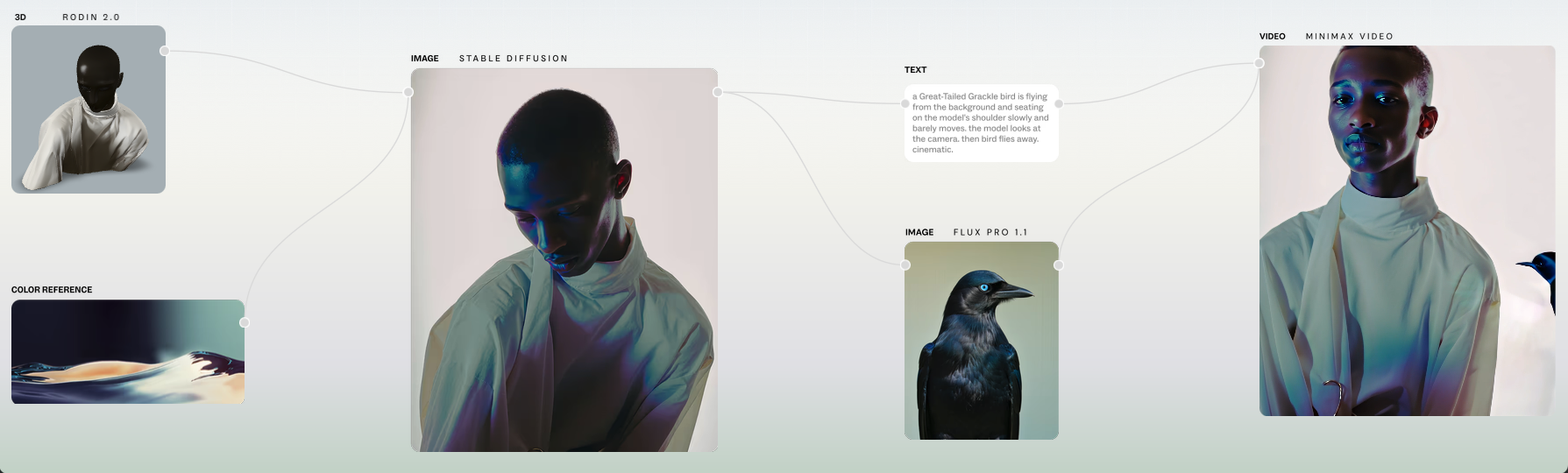
At this point you might be wondering what node-based tools like Weavy, Flora and Fuser have to do with graphic design. The relevant part isn’t that you must become a node engineer.
It’s that these tools visually represent the way modern workflows actually operate: modular, non-linear and relational.
In a node-based system you’re not saying: “First this, then that.”
You’re saying:
“This depends on those inputs. That feeds back here. If something changes, I can adjust without tearing everything down.”
That’s a fundamental shift from checklist thinking to system thinking — and it mirrors how senior creatives actually solve problems in 2026.
Node based AI systems allow you to:
connect research to strategy
feed strategy into visuals
send visuals into motion
loop everything back through critique and testing
And you can see those connections clearly — something that traditional linear methods never allowed.
Understanding this mindset will make your process calmer, more transparent and far easier to explain to collaborators and clients.
How to make your workflow AI-ready without burning it down
You don’t need to rebuild from scratch. You need clarity. Start by mapping how you actually work — not how you wish you worked. Notice where AI already helps and where it feels messy.
Then make deliberate decisions about where AI belongs — and where it doesn’t.
AI can suggest names, summarise research, propose directions and help you explore variation.
But it shouldn’t decide your brand story, your type hierarchy, your accessibility choices or your emotional strategy.
That’s where human judgment lives, and that’s what this type of systems thinking preserves.
If you want a deeper breakdown, I go step-by-step here:
Where AI fits into your graphic design workflow (without killing the vibe)
What to focus on this year: integrating AI into your existing workflow
Here’s the quiet truth no AI tool landing page wants to talk about: Most of them promise, “We’ll do everything for you.” But real creative work has never been “everything done for you.”
It’s research, intuition, judgment, iteration, feedback, craft, editing, restraint, and responsibility. That doesn’t disappear because a model can generate a pretty picture.
If anything, those parts matter more.
The real skill in 2026 isn’t throwing your workflow out and rebuilding it around AI. It’s understanding where AI belongs — and where your traditional process needs to stay firmly in charge.
Think about your usual workflow:
Research, strategy, concept development, sketching, visual exploration, presentation, feedback, refinement and production.
AI can support moments inside those steps — surfacing references, suggesting variations, stress-testing ideas, generating exploratory visuals, summarizing interviews.
But AI should not replace:
the decisions you make about meaning
the story you’re telling
the ethical lens you apply
the hierarchy, legibility and accessibility you ensure
the craft choices that give work its soul
And there’s another, very real layer here that designers often overlook:
Copyright depends on you — not the tool
In many regions, work generated entirely by AI is not protected in the same way as human-created work.
Courts and legal bodies are increasingly using language like: “significant human intervention”
Which means:
If your contribution is simply clicking “generate again,” your ownership is shaky.
If your contribution is direction, editing, recomposing, redrawing, rewriting, iterating, refining and integrating — suddenly, your authorship is visible again.
That’s not just legal protection. That’s creative integrity. I unpack the legal landscape in much more detail here if you want to go deeper:
The AI copyright battle is just beginning — here’s why designers should care
This is where AI becomes craft, not shortcut
The goal isn’t to automate your creativity.
The goal is to use AI to:
think wider before committing
explore more directions, faster
reduce repetitive grunt work
leave more energy for taste, strategy and storytelling
In other words:
AI helps the process move. You still decide where it’s going. And this is the reason why we built the AI Branding Masterclass the way we did. We’re not teaching “hacks” or gimmicks.
We’re teaching how to integrate smart AI processes into a traditional, strategic design workflow — so your work stays intentional, legally safer, creatively yours, and aligned with how real studios operate.
Because the future doesn’t belong to designers who hand everything over.
It belongs to designers who know how to collaborate with AI without surrendering authorship.
Join the free live meetup — let’s think through this together
If you want to see how this looks in real projects, I’m hosting a free live session where I walk through tools, workflows, and real examples — without the hype.
Join the free live meetup. AI & Design in 2026: From Tools to Creative Systems
We’ll explore workflows in plain language, talk about system thinking, and look at how senior creatives can stay intentional in a world that moves fast but never stops asking for meaning.
If you’re already a Creative Futures Hub member, RSVP here (log in first):
Not yet a member? Join here to attend the session. No hype. No fear. Just clear thinking with people who care about craft.
If you’re ready to go deeper, you can also explore the AI Branding Masterclass.
Wrapping it up
AI isn’t replacing designers. It’s moving inside the workflow — supporting clearer thinking, faster exploration, and more intentional outcomes.
Here’s the big takeaway:
AI removes friction — not authorship
Tools change — good judgment doesn’t
Designers who stay intentional, curious, and strategic will win
FAQ: AI & Graphic Design in 2026
Q. How do professional designers actually use AI today?
A. AI isn’t replacing the design process — it’s supporting it.
Designers use AI to:
research faster
explore more directions
develop moodboards and references
stress-test ideas
help with writing, naming, and structure
But the final decisions, taste, strategy, and authorship still come from the designer.
Q.What parts of the design process should NOT be done by AI?
Great rule of thumb:
AI can assist, but it shouldn’t decide.
Avoid outsourcing:
core creative direction
ethical choices
brand strategy
typography decisions
final visual judgment
These rely on human taste, cultural awareness, and accountability.
Q. Can AI-generated design work be copyrighted?
A. In most regions, work created entirely by AI is not protected the same way human-created work is.
Courts often require “significant human intervention.”
If you:
refine
edit
redraw
integrate
direct the choices
then your human authorship becomes visible again — and much safer legally.
(Which is exactly why intentional workflows matter.)
Q. Will AI replace graphic designers?
A. Not if you stay curious, articulate your process, and make intentional choices. AI removes friction, but it doesn’t replace judgment or strategy.
Q. Which AI tools should I learn?
A. Focus on a small set that supports the way you work. Tools change — disciplined thinking doesn’t.
Q. Do node-based tools like Weavy or Flora matter?
A. The philosophy behind them — modular, visible, connected systems — matters more than the tools themselves.
Q. Should I tell clients where I used AI?
A. Yes. Transparency builds trust and avoids surprises, especially as expectations shift.
Q. How do I keep my work from looking “AI generic”?
A. Use AI early to widen exploration, then slow down and refine with intentional choices.